Streaming with Apache Kafka 4
Table of Contents
Earlier this year in March 2025 Kafka 4 was released. Notably, this is the first version that you’re able to run clusters free of Zookeper, using KRaft (Kafka Raft). In my team, a number of people expressed interest in learning streaming, so I thought it was a good opportunity to run a small training session with them. This post a text version of that training, going over the basics of Streaming and Kafka. Python and Docker source code is available at Github: kafka-introduction-training.
This post is loosely based on the excellent Apache Kafka Series - Learn Apache Kafka for Beginners v3 by Stephane Maarek. Definitely recommend getting it on Udemy here. Another great resource is Confluent’s introduction from where I’ll be referencing diagrams.
Theory
Kafka is a distributed software, much like Postgres or MongoDB. Much of its distribution mechanics is analogous to concepts like sharding, etc. The highest level of abstraction is the Cluster. You can connect to a cluster by passing to clients a comma-separated list of kafka instances.
Every node in the cluster should be configured to work as Broker. A broker can send, receive, and store messages. Additionally, brokers can be configured to perform another role, called Controller. The controller is responsible for managing the cluster, assigning partitions to brokers, and handling failover. The brokers hold an election, and one of the eligible brokers is elected as the controller. All instances in the cluster are configured with each other’s addresses, so they can communicate with each other.
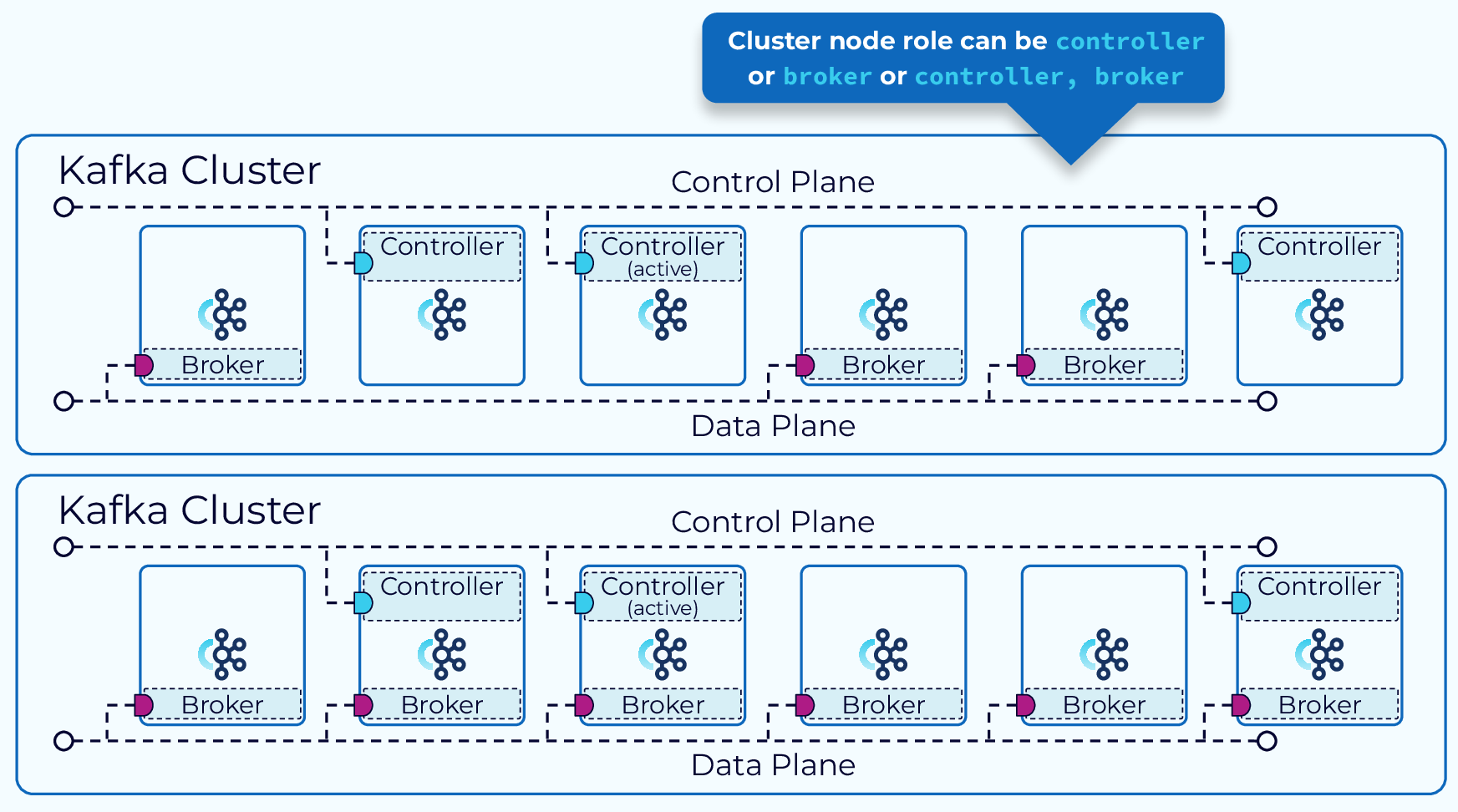
Fig 1: A kafka cluster diagram with brokers and controllers - Confluent.
Data in brokers is organized into Topics. A topic ideally contains messages that are expected to conform to a certain schema. Think of things like user interactions, purchases, transactions, etc. The messages of a topic are distributed into one or more Partitions, that can live into multiple brokers. By convention, you would want a type of message to always end up in the same partition. For example, in a bank transaction topic, you should expect all financial transactions of user 123abc456 to end up in the same partition. Each message in a partition is assigned a unique incremental identifier called Offset.
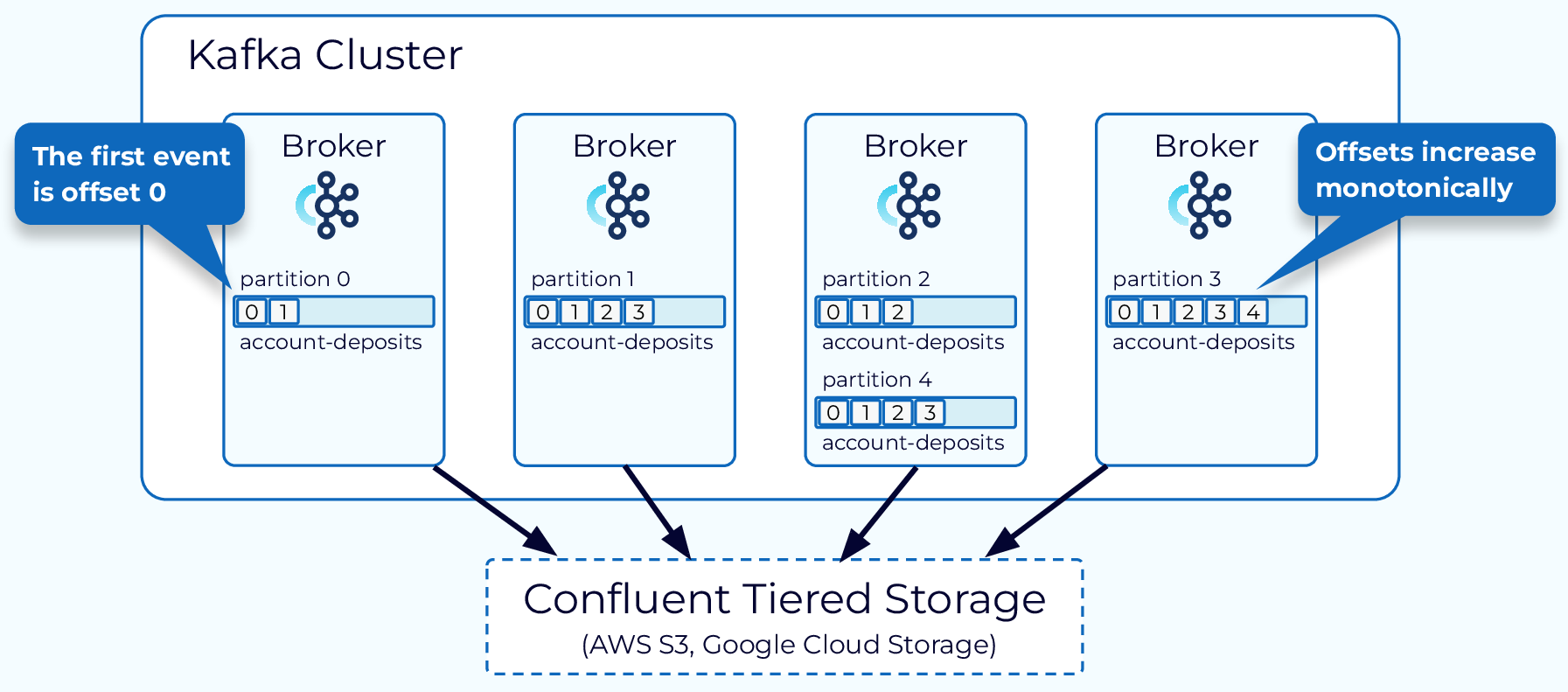
Fig 2: Distribution of messages in a cluster, into different partitions and offsets. - Confluent.
Kafka messages contain essentially a Key, Value, Timestamp, and Headers, and the Topic, Partition, and Offset assigned by Kafka. They can be batched, serialized, compressed, and encrypted. The values are binary, so they can represent text, images, audio, video, etc. Messages are immutable; once produced they cannot be changed. Normally the keys are hashed, and the modulo N of the hash (N being the number of partitions) is used to determine to which partition the message will be sent.
$$partition = hash(key) \bmod N$$
Example
One of the hash functions you can use is Murmur2. If our key was 'sample', the hash would be $2669727418$. If we had $7$ partitions, messages with key 'sample' would be always assigned to partition $1$, since $2669727418 \bmod 7 = 1$.
Keys are also binary, and headers are text. Messages do not live in Kafka forever. Topics can be configured to eliminate messages based on how old they are (e.g., 1 week), how much storage space a Topic may use (e.g., 1GB), or both.
Messages are written by Producers and read by Consumers. Both run independently, and this is important because Kafka exists to decouple what creates data from what processes it. Ideally, producers only run when new data becomes available, and consumers run 24/7 waiting for new data to arrive.
Commonly, you would want to transfer some kind of structured data, and Kafka supports a number of protocols like JSON, YAML, Apache Avro, and Google’s Protobuf. The producers are responsible for serializing, and the consumers for deserializing. The cluster doesn’t care about what data goes through it. The same applies for compression and encryption.
Producers always produce one or more messages to a specific topic (potentially multiple partitions). Consumers however, can subscribe to any number of topics. When subscribing, a consumer will be assigned to one or more partitions of those topics, depending on how many other consumers are in the same Consumer Group.
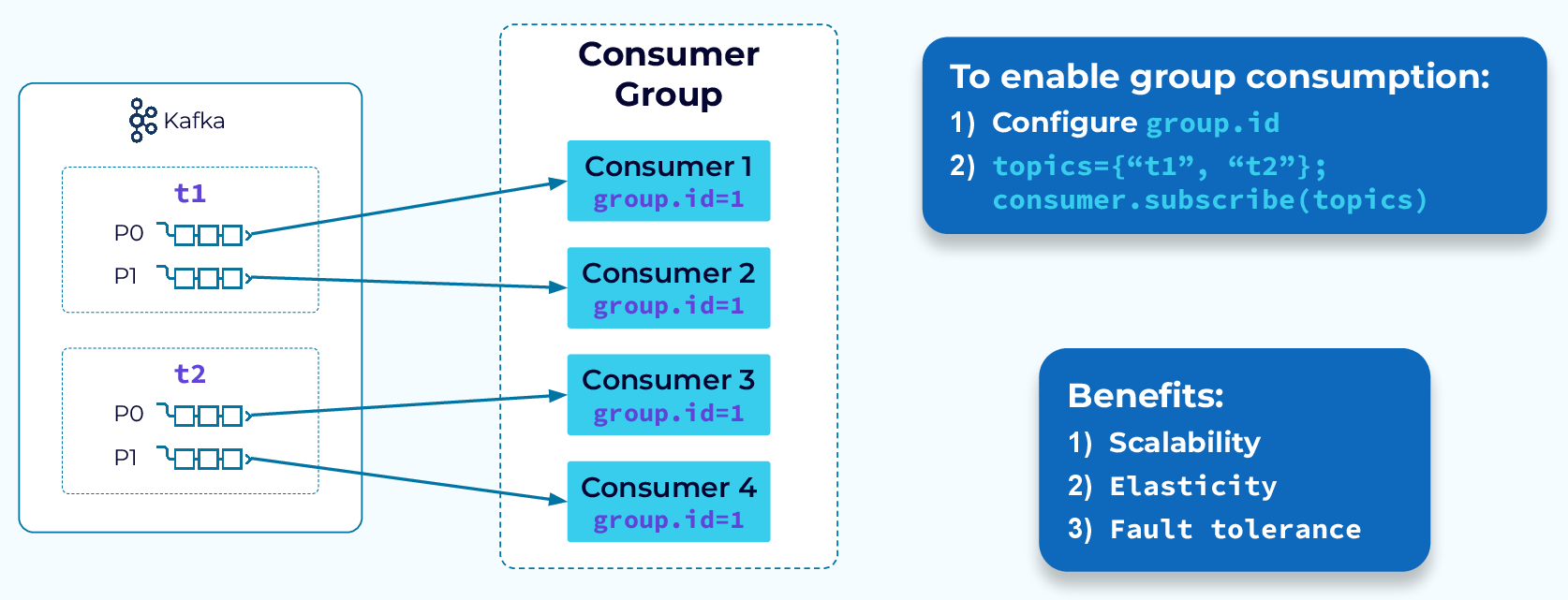
Fig 3: Four consumers in the same Consumer Group reading from two different topics with two partitions each. Each consumer gets one partition. - Confluent.
Kafka is very resilient, so if either a broker dies, or a consumer dies, a rebalancing operation will occur. The controller will redistribute the partitions of the dead broker/consumer to the remaining alive brokers/consumers.
Tip
Kafka supports different rebalancing strategies. I recommend reading this Confluent guide to understand how they work and which one to choose.
Consumers are transactional, which means that every offset that has been read from a partition, by a consumer, needs to be committed back to the cluster. Kafka has many ways to commit offsets for you and reduce the bandwidth needed, but implementations also have the ability to handle committing offsets manually.
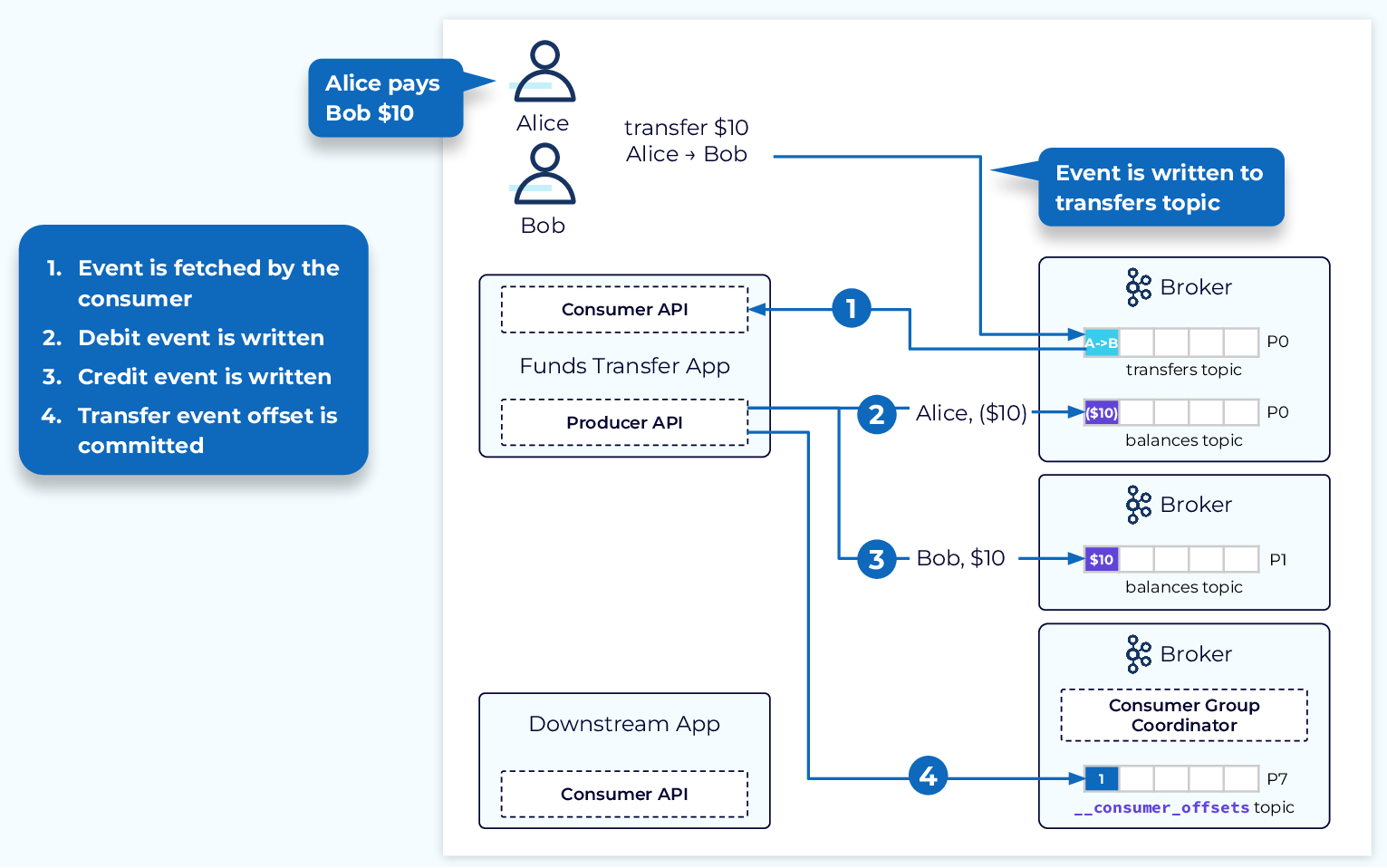
Fig 4: Diagram showcasing how Kafka tracks consumer offsets in a special topic. - Confluent.
Finally, topics can be have replication. This means that each partition will be copied over a number of brokers. In case one of them dies, the same partition in another broker will take over. The small overhead that replication introduces is a well worth price to pay for the added resilience. When producing a message, you can define how many replicas must receive your message before it being considered successfully produced. This confirmation is set using the parameter acks. Setting it to all or -1 will require all replicas to have received the message.
Command Line Interface
When you start a Kafka node using Confluent’s docker image (i.e., confluentinc/cp-kafka:8.1@sha256:9026dbbf280d41868b95ae3995e1fdf0f5db5964776fb9581b52a02e3776d727), those instances will come with the binaries needed to run some admin tasks on Kafka. Here I will list a few examples, but you can find a detailed walkthrough in my repository here. Kafka ships with a large number of CLI’s, the full list is available for reference here.
The first CLI we can use is kafka-topics, which allows us to list, create, describe, and delete topics. You can for example create topics with a certain number of partitions and replication factor like so:
# Create a topic named 'third_topic' with 3 partitions and replication factor of 2
kafka-topics \
    --bootstrap-server localhost:9092 \
    --topic third_topic \
    --create \
    --partitions 3 \
    --replication-factor 2
The next CLI we want to look at is for producing messages, kafka-console-producer. To start a producer prompt you would use something like:
# Produce key-value messages to topic 'third_topic', using a : separator, and requiring all replicas to acknowledge
kafka-console-producer \
    --bootstrap-server localhost:9092 \
    --topic third_topic \
    --producer-property acks=all \
    --property parse.key=true \
    --property key.separator=:
You can type messages in the key:value format, and when done you would press ^C or Ctrl + C to exit.
Next we have kafka-console-consumer, which allows us to create a new consumer in a new group, and read messages from a certain point. We have control of what aspects of each message we want to print.
# Consume messages from 'third_topic', printing timestamp, key, value, and partition, from the beginning, in group 'my-first-application'
kafka-console-consumer \
    --bootstrap-server localhost:9092 \
    --topic third_topic \
    --formatter org.apache.kafka.tools.consumer.DefaultMessageFormatter \
    --property print.timestamp=true \
    --property print.key=true \
    --property print.value=true \
    --property print.partition=true \
    --from-beginning \
    --group my-first-application
Lastly kafka-consumer-groups allows admins to manage consumer groups. You can for instance get details of a group like so:
kafka-consumer-groups \
    --bootstrap-server localhost:9092 \
    --describe \
    --group my-first-application
Python Samples using librdkafka
Below I will provide complete code snippets, for producers and consumers. In the repository there are several Jupyter Notebooks detailing step-by-step cells on how to build them. They contain an end-to-end example reading updates from Wikipedia and storing them in Elasticsearch.
Admin
The following example will attempt to create a topic, if it didn’t already exist. The create_topics method is an async promise, so we need to call the result() method to block until it’s done.
from confluent_kafka.admin import AdminClient, NewTopic

admin = AdminClient({'bootstrap.servers': servers})
topic = "third_topic"
# new topics to be created
new_topics = [NewTopic(topic, num_partitions=3, replication_factor=2)]
future = admin.create_topics(new_topics)
# Wait for each operation to finish.
for topic, f in future.items():
    try:
        f.result()  # The result itself is None
        print(f"Topic {topic} created")
    except Exception as e:
        print(f"Failed to create topic {topic}: {e}")
Tip
Topics should follow naming conventions!! This is very important because consumers can subscribe to topics using regular expressions (wildcards). There is a great overview here but in summary: use lowercase letters, separate categories with dots, and include the semantic version. A good template is <data-domain>.<data-type>.<environment>.<version>. For example, sales.purchases.prod.v1.
Producer
All producer (P) and consumer (C) parameters are available at librdkafka’s configuration reference. Here we just produce numbers from 0 to 999, and flush every 10 messages. Flushing in production is not necessary.
from confluent_kafka import Producer, KafkaException
import requests
# bootstrap servers
servers = "kafka_node_1:9092,kafka_node_2:9092"
topic = "test_topic"
# These are sample parameters, most of them do not need to be changed from their defaults.
producer = Producer({
    "bootstrap.servers": servers,
    "client.id": "producer_sample",
    "request.required.acks": "-1", # requires all replicas to acknowledge
    "enable.idempotence": "true", # avoids duplicates on retries
    "retries": str(((2 ** 32) / 2) - 1), # max signed integer of 32 bits
    "delivery.timeout.ms": "120000", # 2 minutes
    "max.in.flight.requests.per.connection": "5",
    "linger.ms": "20",  # time to wait before sending a batch, in ms
    "batch.size": str(32*1024),  # measured in bytes, 32KB
    "compression.type": "snappy",
    "sticky.partitioning.linger.ms": "40", # should be double the linger.ms
    "partitioner": "murmur2_random" # hash, empty keys are randomly assigned
})
# number of messages to produce in a batch
BATCH_SIZE = 10
batch = []
# sample content to produce
messages = range(1000)
# main producing loop
for message in messages:
    batch.append({"value": str(message)})
    if len(batch) >= BATCH_SIZE:
        try:
            producer.produce_batch(topic, batch)
        except (BufferError):
            print("The producer queue is full, increase the cluster throughput")
            break
        except (KafkaException) as e:
            print(f"Failed to deliver messages: {e}")
            break
        producer.flush() # (optional) guarantee delivery of batch
        batch = []
Usually Kafka will only allow you to produce messages up to 1MB. If you do need to send larger messages, the recommended approach would be to use a separate distributed file system (e.g., AWS S3, Azure Blob Storage, GCS). The producer would upload the content, get a reference, and send the reference through Kafka. Then the consumer needs to get the reference, download the content, and process it.
Consumer
In the python implementation (unlike the Java one), consumer.poll will only fetch one message at a time. Calling consumer.consume allows us to set a batch size, and it will return either when the batch is full, or when the timeout is reached.
from confluent_kafka import Consumer
servers = "kafka_node_1:9092,kafka_node_2:9092"
topic = "test_topic"
# Initialize Consumer with some sample parameters
consumer = Consumer({
    "bootstrap.servers": servers,
    "group.id": "opensearch_group",
    "auto.offset.reset": "earliest",
    "partition.assignment.strategy": "cooperative-sticky", # rebalance strategy
    "group.instance.id": "0",
    "enable.auto.commit": "false",
    "max.poll.interval.ms": str(5 * 60  * 1000), # 5 minutes
    "fetch.min.bytes": "1",
    "max.partition.fetch.bytes": str(1024 ** 2), # 1MB
    "fetch.max.bytes": str(55 * 1024 ** 2), ## 55MB
    ### the settings below would enable auto commit every 5 seconds
    # "enable.auto.commit": "true",
    # "auto.commit.interval.ms": "5000"
})
# Number of records to consume at a time
BATCH_SIZE = 50
# Sample function to process a batch of messages
def do_something(batch: dict) -> None:
    """Do something with the batch of messages."""
# Main consumer loop
try:
    consumer.subscribe(topics=[topic])
    while True:
        records = consumer.consume(num_messages=BATCH_SIZE, timeout=1.0)
        if not records:
            print("No records received")
            continue
        batch = []
        for record in records:
            if record.error():
                print(f"Consumer error: {record.error()}")
            else:
                message = record.value().decode('utf-8')
                batch.append(message)
        do_something(batch)
        consumer.commit(asynchronous=False) # (optional) commit offsets synchronously. Ideally you let Kafka handle it.
except Exception as e:
    print(f"Error consuming records: {e}")
    consumer.close()
except (KeyboardInterrupt) as e:
    print("Graceful shutdown, consumers will be closed")
    consumer.close()
Calling consumer.close() gracefully will let the cluster know the consumer is done. Otherwise, you have to wait for multiple failed heartbeats before the controller considers it dead and triggers a rebalance. This can take several minutes and is not recommended.
Another thing to note is that the consumer group’s offset will be stored in the cluster. This means that restarting a consumer will not read from the earliest position, but rather from the last committed offset. One can, if required (not generaly advised), reset the offset of a partition/topic using:
from confluent_kafka import TopicPartition
partition = TopicPartition(topic="second_topic", partition=0, offset=0)
consumer.seek(partition=partition)
Danger
An important aspect of Kafka is that (if configured correctly) messages are guaranteed to be delivered at least once. It is critical to make sure that consumer message processing is idempotent. This means that whatever you do with the message needs to be an "upsert" type of operation.
Schema Registry
The idea here is to get the schema with a given name. In the snippet below, we get the latest version of that schema, and we assume it’s an AVRO schema. I didn’t include the code for the deserializer, but it would be analogous. The class confluent_kafka.schema_registry.avro.AvroDeserializer also supports a direct __call__ method, where you would pass the binary (and context) and receive a dictionary.
from confluent_kafka.schema_registry import SchemaRegistryClient
# Initialize Schema Registry client
schema_registry = SchemaRegistryClient({'url': 'http://schema-registry:8081'})
schema_name = "example_schema"
# Get latest version of the schema
latest_version = schema_registry.get_version(subject_name=schema_name, version="latest").version
print("Version: ", latest_version)
schema_id = schema_registry.get_version(subject_name=schema_name, version="latest").schema_id
schema = schema_registry.get_schema(schema_id=schema_id, subject_name=schema_name).schema_str
print("Schema: ", schema)
# Now we initialize the serializer
from confluent_kafka.schema_registry.avro import AvroSerializer
# We need the registry client and a specific schema
serializer = AvroSerializer(schema_registry_client=schema_registry, schema_str=schema)
# Now we can serialize records
from confluent_kafka.serialization import SerializationContext, MessageField
# Example record to serialize
record = {"name": "John Doe", "age": 30}
# Serialize dictionary into bytes
try:
    binary_value = serializer(record, SerializationContext(topic, MessageField.VALUE))
except (ValueError, AttributeError, TypeError) as e:
    print(f"Serialization error: {e}")
The library will give you very precise errors on what went wrong if an exception is raised. Examples include missing required fields, wrong data types, etc.
Kafka Connect
Kafka Connect is a separate tool, that requires it’s own cluster. Much like Airflow, you register and manage tasks. Tasks are called Connectors, and they can be either Sources (producing data into Kafka), or Sinks (consuming data from Kafka). When setting up your Connect cluster, you need to set up a folder where you will place the jar files for the connector you want to use. A large list of connectors can be found at Confluent Hub. Look for the Self managed tag.
Setting up connectors is as easy as providing a JSON configuration via UI. In the repository, the Kafka Extended Markdown takes you through an end-to-end process of setting up a source and a sink.
Kafka Connect configurations will usually take in parameters like:
{
    // base Connect parameters
    "name": "example-sink", // connector name
    "connector.class": "io.confluent.connect.technology.ExampleConnector",
    "tasks.max": "1", // max number of parallel tasks
    "topics": "example.topic", // topic to read from
    "key.ignore": "true",
    // schema-related parameters
    "schema.ignore": "true",
    "connection.compression": "true",
    "key.converter": "org.apache.kafka.connect.json.JsonConverter",
    "value.converter": "org.apache.kafka.connect.json.JsonConverter",
    "key.converter.schemas.enable": "false",
    "value.converter.schemas.enable": "false",
    // connector-specific parameters
}
Kafka Connect also allows components that do single-message transformations and conversions. These are more edge use-cases. If you would use Java to implement something like this, it’s better to go straight to Kafka Streams. Other alternatives include using Apache Spark, Apache Flink, other stream processing frameworks, or writing it yourself. Producer/Consumer logic is usually very simple.